
Blog
How to register Macgo Windows Blu-ray Player
09/25/2013 12:58In order to avoid some unnecessary problems during Macgo Windows Blu-ray player registration process, I’d like to act out the simple steps here.
However you buy the player, you will receive an email with a registration code in it.
Double click Windows Blu-ray player you have downloaded ahead of time to run it. Input your email address and registration code into the boxes on the dialogue.

Then click “Register” to finish it. When popping up a message “Congratulations! You have successfully registered!” , it means you succeed.

Press “OK” to begin your Blu-ray movie enjoyment journey.

Please share your movie and using Blu-ray player experience to your friends on Facebook andTwitter.
Macgo region free Blu-ray player perfect support Windows OS
09/23/2013 13:54Macgo Region Free Blu-ray player could play Standard Blu-ray Discs from Region A, B and C. Many people have collections of standard BD movies from all parts of the world and this is a perfect player to play those International Blu-ray Discs. Flaunting Full HD 1080p video output this Windows Blu-ray player lets you soak up your favorite entertainment from anywhere in the world in unbelievable clarity.
As with the implementation of region codes for DVDs, The Blu-ray disc region coding scheme divides the whole world into three regions: A, B, and C. Blu-ray Disc players sold in a specific geographical region are designed to play only discs authorized by the content provider for that region. Unlike DVD region codes, Blu-ray region codes are verified only by the player software, not by the optical drive's firmware. In circumvention of region coding restrictions, stand-alone Blu-ray Disc players are sometimes modified by third parties to allow for playback of Blu-ray Discs (and DVDs) with any region code. While what I will introduce next is an absolutely legal Blu-ray media player–Macgo region free Blu-ray player which has been admitted by Blu-ray Disc Association.
Though it is powerful enough, the operation is as simple as you can imagine which is just opposite to other complicated process. Let’s take trial version for example.
Step 1: Free download region free Blu-ray player from Macgo official website and install on your computer.

Step 2: Start up Macgo Windows Blu-ray player
After installation, let’s start it up by double clicking on its desktop icon. Click “Cancel” in the popped up registration dialogue to continue your play. On the main UI, there’re two options: “Open file” and “Open Disc”.
Step 3: Load in Blu-ray movie
There is no need to click on the button “Open Disc” if you want to play a BD, instead we just insert the BD into Blu-ray drive and wait for several seconds. The player will load in the movie automatically. By the way, remember connect your BD drive to computer. When loading finished, you will get a movie picture with simple menu on the left through which you could make several changes to the movie such as “Subtitles”, “Audio” and “Chapter”. Click “Play Movie” to enter.

While if you want to play Blu-ray ISO files, we will use the button “Open Files” to select specific file you like. Then open it in player to load in. Next, you can do as the above.
Step 4: Don’t forget to share your Blu-ray movie information on Facebook and Twitter.

How to install and run Macgo Windows Blu-ray Player
09/22/2013 15:40With the spreading using of Macgo Windows Blu-ray Player, the headache to play back Blu-ray on Win seems to gradually fade. But there may be some confusion in the operation process, so here I’d like to demonstrate the steps in detail.
First, free download Macgo Windows Blu-ray Player

Second, install it on your Windows-based computer immediately
Third, start on Windows Blu-ray Player software
The main interface will pop up, followed by another dialogue with Email Address, Registration code and three options: Buy Online, Register and Cancel.
Press “Cancel” to continue your trial version with watermark when playing the Blu-ray media.
Or press “Register” after entering your purchased registration code and the email address you used.
Or press “Buy Online” to directly access Macgo Store page to order your product.
Now you can enjoy your movie by clicking on “Open file” or “Open Disc”

If you still have some other problems about the using instruction, please don’t hesitate to contact our support.
Free Mac MP4 Player - Mac Blu-ray Player works as free MP4 Player on Mac
09/13/2013 17:41Would you like to watch MP4 movies on Mac? Definitely! Now many movies are released in MP4 format, but how to play them on Mac is a big problem. Thanks for Mac Blu-ray Player which makes MP4 available on Mac systems.
Mac Blu-ray Player can not only be used as Blu-ray player on Mac but also be used as free MP4 player. It is very handy for you to play any MP4 movies with high quality by this fantastic tool. As a free MP4 player on Mac, Mac Blu-ray Player can play any MP4 movies. With simple process, Mac Blu-ray Player will bring you to the amazing MP4 world.
Step 1: Download
Download the free Mac MP4 player and then install it.
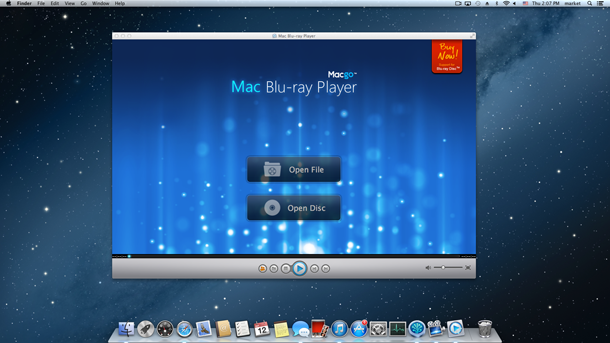
Step 2: Operation
Open Mac Blu-ray Player, and the registration dialogue will pop up. Click the "Continue" button and then you can play MP4 for free.

Now there are two open buttons on the interface: "Open File" and "Open Disc". If you want to play MP4 files, you can press "Open File" button, then click the MP4 document to start playing directly.
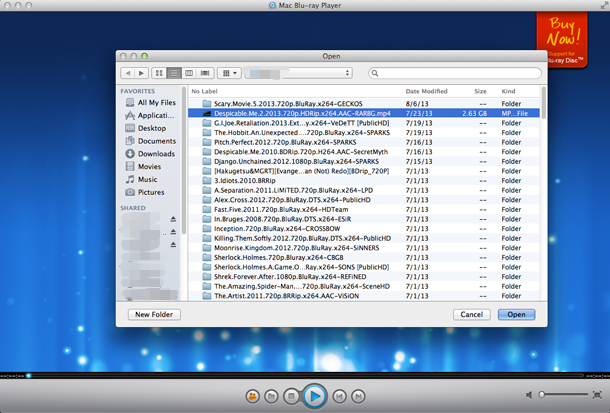
Wait for a bit, and the MP4 file will be played for you directly. You just sit there and enjoy your video!
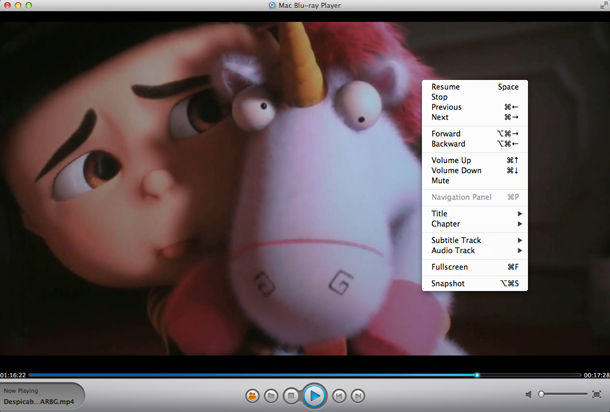
You can control almost everything on the user interface, like, pause, stop, volume up/down, backward/forward. These things can also be done if you right click your mouse.
What Will Apple Bring About to Brighten Your Days?
09/11/2013 10:48Apple announces its September 10 iPhone event in Cupertino: ‘This should brighten everyone’s day’.
Apple has just sent out invites for their September 10th event, scheduled for 10 AM PST, via The Loop. Apple is hosting the event on campus in Cupertino.
The invite reaffirms expectations that Apple will launch two new models of iPhone for the first time, dubbed the iPhone 5S and the iPhone 5C. As indicated by the numerous case leaks over the last few months, the iPhone 5C is expected to be available in a variety of colors. The invite seems to back this up, showing many different colored dots and uses the strapline “This should brighten everyone’s day”, which further hints at the possibility of different colors.

For the 5S, the design will be similar to the current iPhone 5, with improved internals (such as a faster, more efficient A7 processor), a possible fingerprint sensor and be offered in a gold variant, alongside the usual black and white color choices.

Apple will announce the official launch dates for these new devices at the event. Apple’s behaviour in the previous years would suggest that the new iPhones will be available to buy on the 20th September, two weeks after their announcement. On Friday, we reported that Verizon is blocking employee vacations between the 18th and the 22nd of September, a very good indicator that new iPhones will be released in this timeframe.
At the September event, Apple is also likely review the final features of iOS 7, including when the operating system will be released to the public. It is expected that Apple will release a gold master version of the redesigned OS for developers on the same day. New version of iWork for Mac and iOS may also be demoed, after being announced early at WWDC.

Apple product always could arouse our interest to explore more potential on it such as finding a way to realize HD Blu-ray movie enjoyment on all Mac models or the new released iPhone products, even on other mobile divices such as iPad, iPad mini anf iPod touch. Finally, we found Mac Blu-ray player is the key point of this audiovisual experience. Don’t forget to connect a Blu-ray drive to your Mac machine when intend to play a Disc. Otherwise, you may choose other Blu-ray ISO image files or Blu-ray folders. If you have some interest in playing some DVDs, it also could do a good job wherever the Disc comes from. As a region-free Blu-ray player software and auniversal media player, Mac Blu-ray player is doomed to be the perfect choice to decorate your beloved Apple computers. Until now, the Mac OS ranging from 10.5 to 10.8, even the latest OS X Mavericks are all accessible.

Bloggers and Apple-watchers can pile together all the Apple rumors they’d like, but at the end of the day the element of surprise cannot be underestimated. Apple still marches ahead with bringing more and more surprise to its chasers. So does Macgo. And now it has improved Mac machines on Blu-ray playback capacity and some other HD video and audio enjoyment. All these changes make us believe a bright and powerful multimedia world will be produced by Mac Blu-ray player in the near future.
Apple Released the OS X Mavericks Developer Preview 7
09/04/2013 18:12Apple is moving steadily forward on OS X Mavericks, releasing the Preview 7 versionto developers today nearly three weeks after the release of the sixth Developer Preview. The new preview doesn’t have any notable feature additions but includes a few extra wallpapers and a link to a new OS X Mavericks page that is not fully live, yet. Registered developers can receive the update via the Software Update tool in the Mac App Store.

The new release points to a new Mavericks website detailing the new features.
iCloud and iCloud Keychain
iCloud Keychain users will be prompted to reenable iCloud Keychain after installing Developer Preview 7.
Installation
Network migration from earlier versions of OS X requires the Migration Update for Snow Leopard, Lion, or Mountain Lion, available from the Mac Dev Center.
Migration from Windows is not supported in Developer Preview 7.
iBooks
PDFs imported into iBooks in previous seeds of OS X Mavericks may be renamed when opened with Preview.
Other
Screen recordings taken with Developer Preview 7 are not compatible with earlier releases of OS X.
Fusion Drive volumes created with Developer Preview 7 are not compatible with OS X v10.8.4 or earlier.
Moving a full-screen Aperture window to a secondary display may prevent the app window from being visible in subsequent attempts to use full screen.
In Full Screen in Aperture, some menus and thumbnails aren’t immediately available until interacted with by the user.
When in Full Screen in Aperture, the toolbar at the top of the window may not be usable until it is locked.
Starting in Developer Preview 4, non-admin users will be allowed to install and update software from the Mac App Store. This functionality can be disabled with a profile that sets the “restrict-store-require-admin-to-install” key to true (boolean) in the com.apple.appstore domain.
The new released seventh developer preview of OS X 10.9 Mavericks includes eight beautiful new wallpapers. The new wallpapers depict various landscapes including a scenic mountain view and yet another oceanic-themed wave. Check out our gallery below and try out the new Mavericks wallpapers for yourself!


Called as “a bag of hurt”, Blu-ray has always been die-hard trouble for all the Mac users. Every updates and release events brought great surprise, as well as one more time disappointment. The Blu-ray playback capability is what we need urgently and hope to find even from the third party software. According to some reviews from authoritative websites such as Macworld and Tuaw, we could figure it out that Mac Blu-ray player out of Macgo tops the list. It is the first Blu-ray player software for Mac in the world and already accepted by a large number of Apple fans. All Blu-ray Disc, Blu-ray files, and Blu-ray folders (BDMV folders) can be perfectly played on MacBook Pro, Air, Mac mini, iMac, Mac Pro with OS X 10.5 to 10.8, even the latest Mavericks. What great news!
Updates to the Mavericks beta have been pushed out systematically over the summer, and Apple will ship the OS to the public this fall. The September 10th event will focus on iPhones, and a separate media event is expected to take place next month. Apple could release Mavericks at any time this fall, but it’s likely that a release date will be given alongside new iPad/Mac hardware in October.
Macgo’s getting ready for the upcoming iPhone 5S and iPhone 5C
08/28/2013 16:34It is said that the release date of the iPhone 5S and the iPhone 5C may happen on September 10 in America. According to a Japanese news website called Nikkei, the iPhone 5S and the iPhone 5C will arrive in Japan on September 20. Last year, iPhone 5 arrived 9 days after the official announcement. And the upcoming release of the official version of iOS 7 would be another proof. According to reports, the seventh and final beta version of iOS 7 is about to be released soon, which will contain the final updates of the iOS. So it is quite possible that the new iPhone 5S and iPhone 5C might be out on the market on September 20.

People are expecting the iPhone 5S to replace the current iPhone 5 with its upgraded features. In addition to the conventional black and white models, there seems to be a new gold iPhone 5S coming, according to the newspaper. It is speculated that the iPhone 5S will include A7 quad core processor, official version of iOS 7, fingerprint sensor and up to 128 GB internal storage.

Besides, the cheaper version of iPhone named as the iPhone 5C might include dual core processor, a 4-inch screen display, and a plastic casing. There’s no doubt that it will compete with those cheap Android-based smartphones on the market.

It is well known that Macgo Mac Blu-ray Player has already made it possible for people to enjoy Blu-ray movies on Mac. People can even watch Blu-ray on their iPhones and other Apple mobile devices by usingAirX on Mac Blu-ray Player. However, this function’s still not incompatible with iOS 6.0+. It is true that AirX is yet to be optimized. Margo’s getting ready, after the release of the official version of iOS 7, we guarantee to solve this kind of problem really soon, and people can finally have some HD Blu-ray entertainment on their brand new iPhone 5S and iPhone 5C.
Five Great Expectations for Apple Event in September
08/22/2013 19:12If AllthingsD continues their accurate predictions of the Apple conference, we will see Apple launches the new generation of iPhone on September 10. There is no doubt that the new iPhone will always be the most popular Apple product which catches the attention of most media no matter in which year. So iPhone must be a top priority however much fall announcements Apple plans to hold this year. What will happen to this year’s iPhone?
Or rather, what this year’s iPhone can be anticipated? Of course the real answer is hold in the hand of Apple. But before the answer, we can make a summary about five big hopes on September event according to the earlier rumors.
A brand new, cheap iPhone
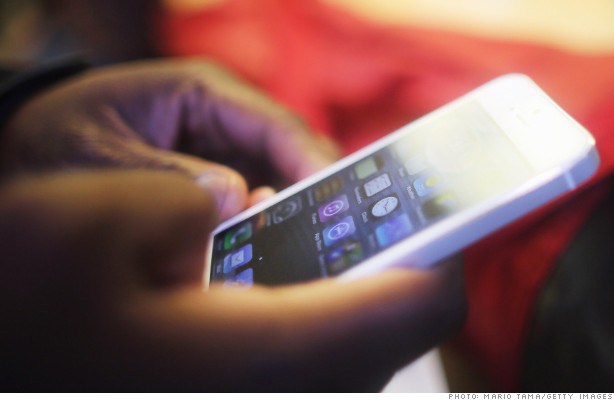
From initial analysts prediction to subsequent revelations of a large number of photos, and then to various confirmation of insiders, our view on low-cost iPhone has also changed from the original “unbelievable” into “as if it seems like this”. Now what we only wait for is the release of Apple.
A fingerprint sensor
As early as 2012, Apple had acquired the fingerprint sensor manufacturers Authen Tec for $350 million and since then the rumors about the time when fingerprint scanning technology will applied to apple products spread. If no accident, the iPhone 5S will be the first Apple phone equipped with fingerprint scanning.
A variety of color choices
“Colorful” is the common phenomena in modern smart Phone. Whatever the platform of flagship of the machine is, Android or Windows Phone, we can see the same kind of mobile Phone has a variety of color matching. Perhaps from this year on, iPhone will also join the colorful rank. What color would you most like to see on the iPhone?
Larger screen
Cook once said that there is a lot of “compromise” to make big screen (more than 4.0 inch screen of iPhone 5) mobile phone, so Apple will not yet to consider this aspect. Having said that, we have to admit that “large-size screen” has ambiguously become the development trend of smart phone. Will Apple conform to the trend?
The new iPod touch
Last year’s extreme thin + colorful iPod touch really made an impression on us at the moment. Compared to iPhone 5 which had been exposed half a year in advance, iPod touch 5 is undoubtedly one of the most amazing apple products in 2012. It is not certain that if this kind of surprise can still continue in 2013?
Whatever we expected for Apple September event, one unchangeable truth is that Blu-ray hardware from Apple isn’t likely, which disappointed a lot of Mac users and Blu-ray fans. In the journey of exploring blu-ray playback, Macgo take the lead in playing Blu-ray on Mac through its product – Mac Blu-ray player. It is the best Blu-ray player software until now to play Blu-ray Disc, Blu-ray ISO image file and Blu-ray folder with ultrafast loading speed and HD audiovisual effect. What makes it more distinctive is that it can play all the Blu-ray movies even the new released on our beloved Apple mobile devices including the upcomingiPhone 5S and rumored retina iPad mini.
Recently Blu-ray navigation menu is going to be added in order to make Macgo Mac Blu-ray player more all-round, so let’s give as great expect on this new surprise as on Apple fall announcement.
First Tizen System Phone is Coming
08/21/2013 19:15
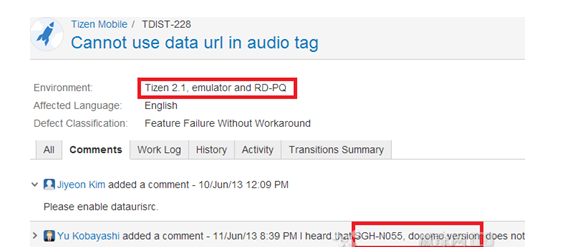
Although the status of Samsung is unshakeable in Android, in order to prevent one day Google undercutting, Samsung has united Intel to jointly develop the Tizen operating system for a rainy day. There is no clear answer about the exact time when the first mobile phone equipped with Tizen system will be released to market, but it was reported earlier that SGH – N055 is the first Tizen phone model.
In addition, according to media reports, a few days ago when Tizen developers discussed about a bug in the BBS, a developer from Japan said “DoCoMo version of SGH – N005 hasn’t encountered this problem” in the comments, which means the first Tizen phone prototype has already been testing now in Japan operator NTT DoCoMo internally. It shouldn’t be long to launch.
In the early days, it has been reported that the first Tizen will be landing to five countries, including Japan in October. There are also reports that Samsung will officially release Tizen mobile phone at the first global developer conference that will be held at the end of October. The official time to market was set for November or December this year, aiming at the end of the year’s shopping season.
Even though the specification of first Tizen mobile phone is unclear, considering Japan being one of the starting areas, we can expect the first Tizen mobile phone will have some common features in Japanese area such as waterproof and dustproof.
The most advanced mobile phone operating system is iOS until now which is applied to Apple products iPhone, iPad and iPod touch. Besides its faster run, multifunctions and good user experience, the accessibility to Blu-ray is also a major bright spot. Maybe AirX is a brand new word and technology to many Android OS users, but it is not strange at all to Apple fans because of Macgo Mac Blu-ray playerwhich is the world’s first and best Blu-ray player software and could play almost all the media formats on Mac and PC. The splendidness is far more than that. AirX is the core technology in Mac Blu-ray Player 2.0 serial versions which makes Blu-ray movie playable on your Apple mobile devices. So if you want to make the movies be shared between Mac/PC and iPhone/iPad/iPod touch, please visit more details here
https://www.macblurayplayer.com/airx-makes-blu-ray-playable-on-iphone-ipad-ipod-touch.htm
Welcome the Final Macgo Blu-ray Navigation Menu
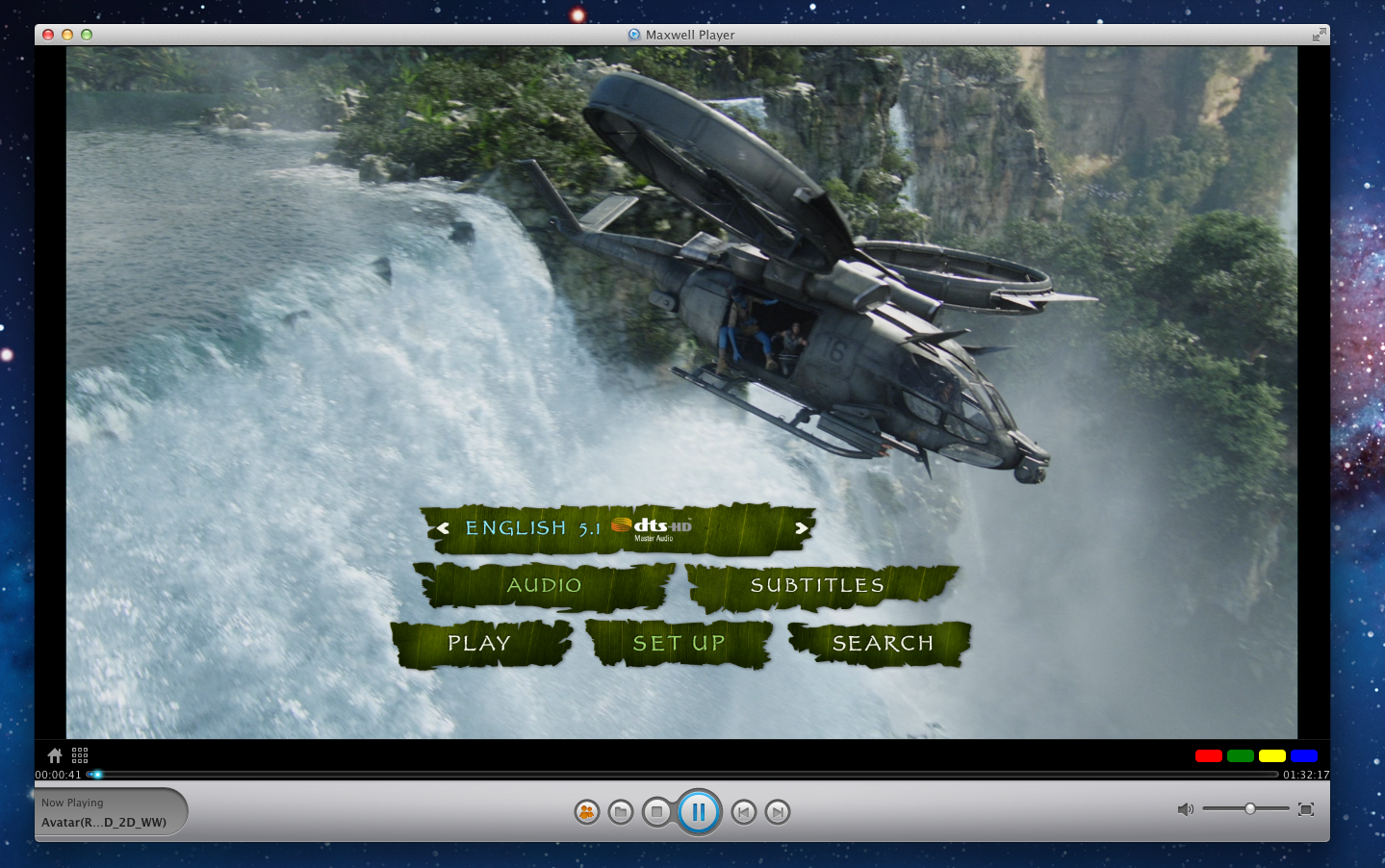
08/20/2013 16:58Blu-ray navigation is a navigation menu which can be brought up and selected during the playback of a Blu-ray Disc by Blu-ray player so as to operate and control the Blu-ray video content conveniently. It is also the reinforcement and upgrade of VCD and DVD navigation menu. As a result it could greatly enhance the operability and experience of the Blu-ray Disc.
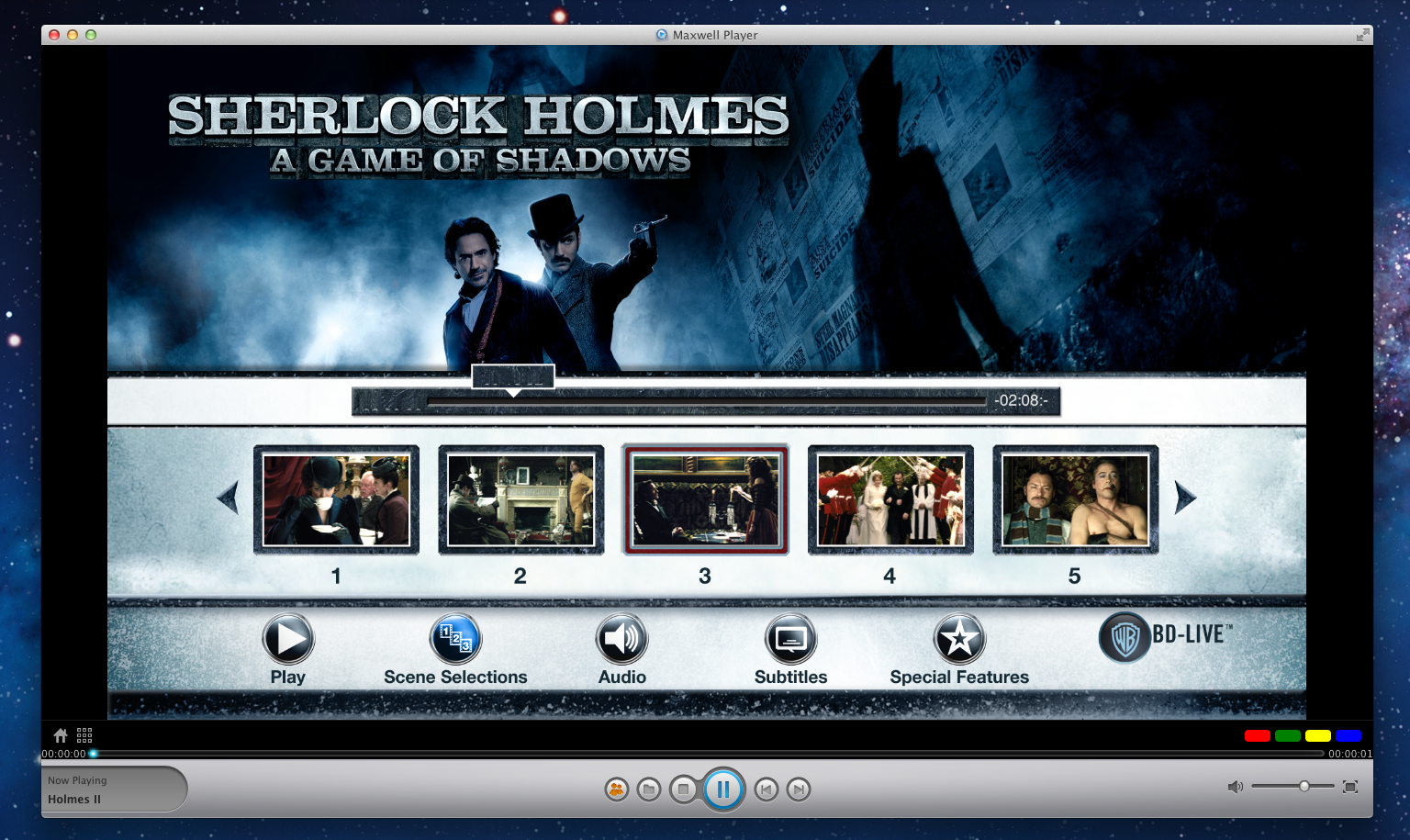
At present, there are only a very few Blu-ray players support Blu-ray menu function, which leads to the great difficulty when users want to find an ideal Blu-ray player software for their Mac/PC. Considering this demand, we have put Blu-ray navigation into agenda since May to make Mac Blu-ray player which is the world’s first and best Blu-ray player software perfect.
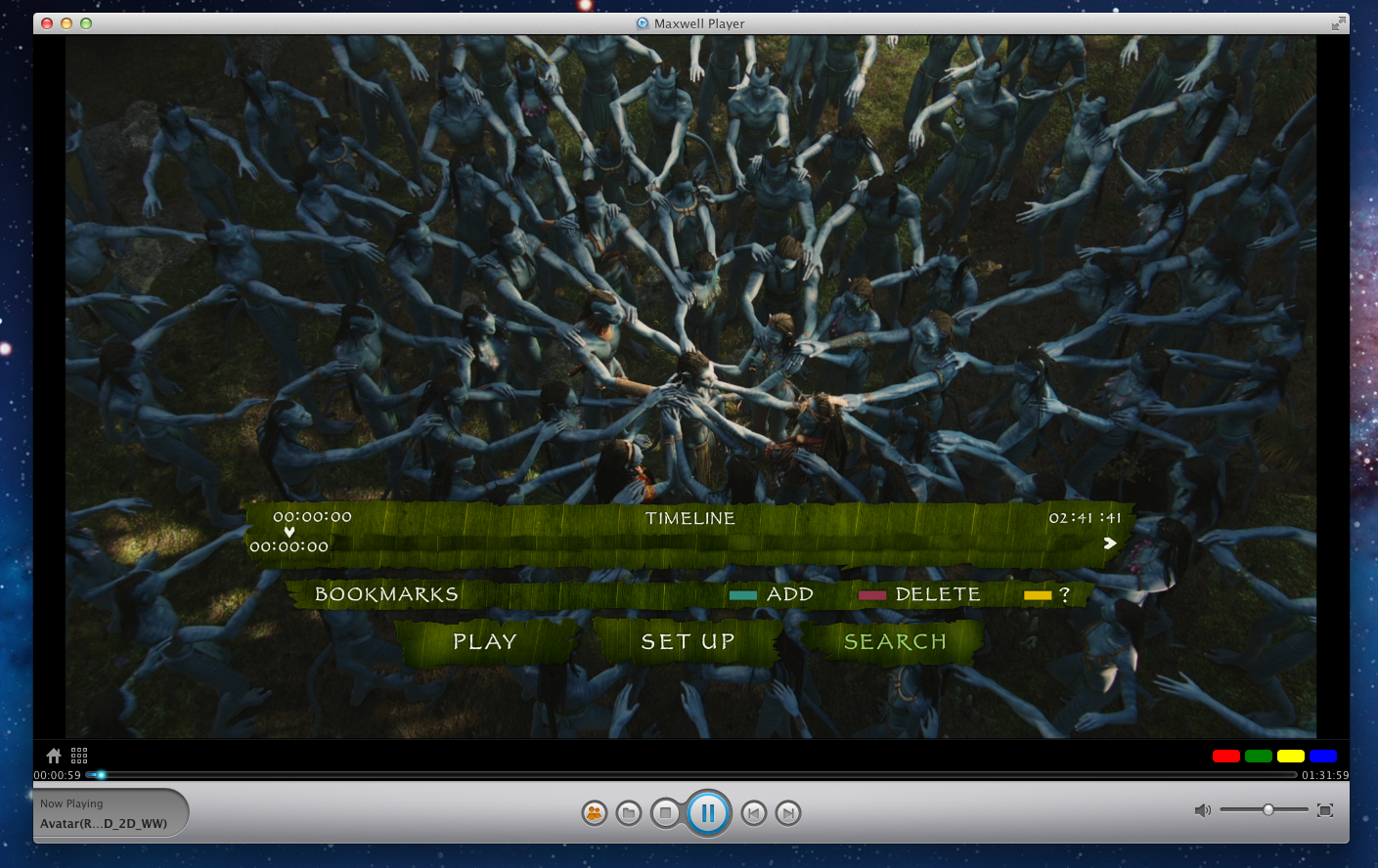
Nevertheless, we have obtained some achievements during this tough time despite being questioned all the time. In order to present a mature and perfect product when the official version meets customers, we have tested over and over, at the same time recruited a group of testers from our loyal users as well to help us. Just as we know nothing good comes easily, a part of Blu-ray Disc menu has been supported by Macgo internal Beta version eventually through trial and error. And we can’t wait to share the exciting news to all the enthusiasts who has always kept a watchful eye on us.
We believe it will not be long before the final Macgo Blu-ray navigation menu arrives with our joint effort, therefore every bit of feedback of yours is still valuable for us and always welcome at this critical moment. For more test information, please visit
https://www.macblurayplayer.com/beta.htm